openDJ
openDJ is a free, open-source DJ app for macOS and Linux, built in Rust. It's made to be fast, pleasant to use, and to have a great Automix, for DJs just starting out and for experienced DJs alike.
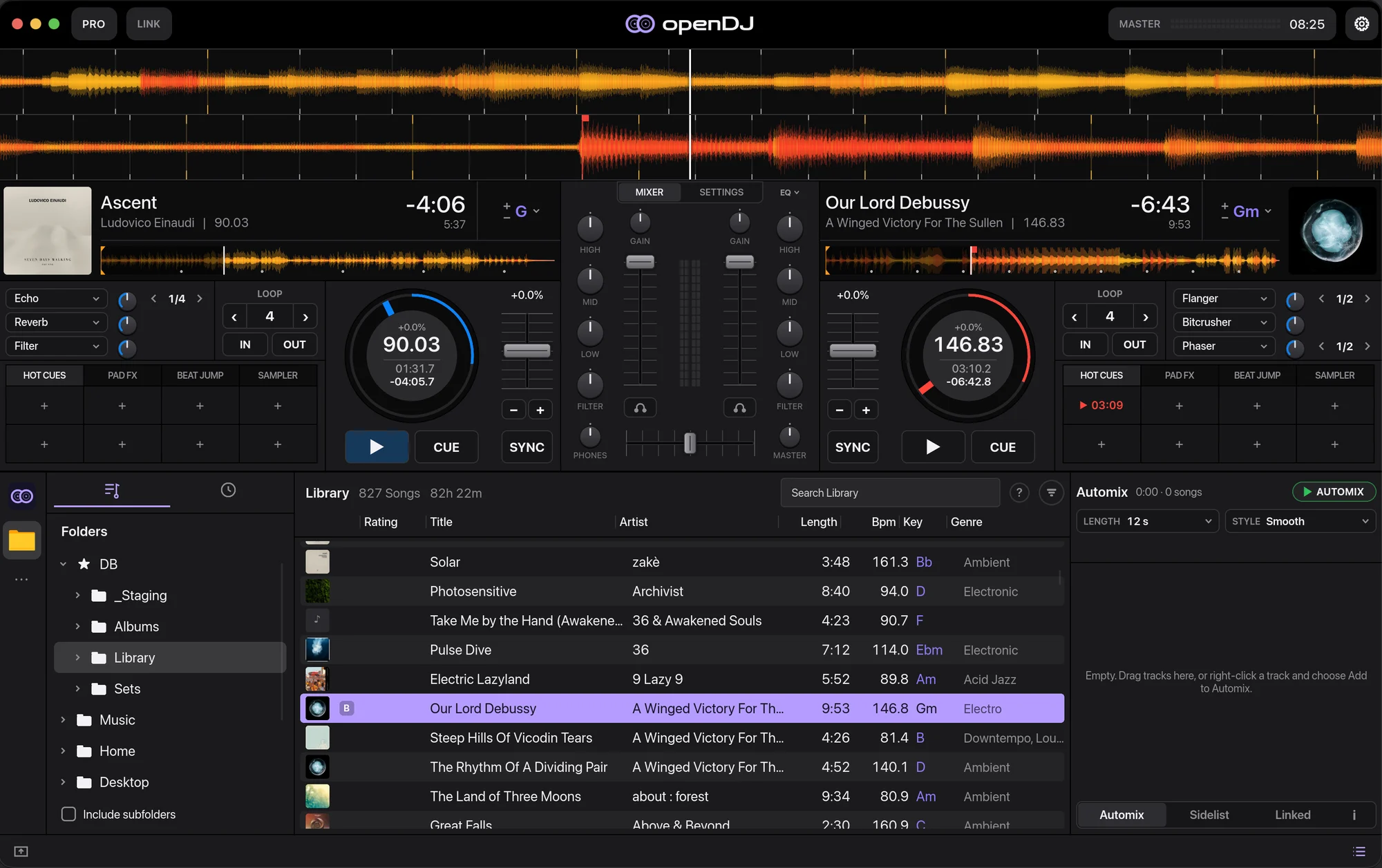
These docs have two parts:
- The user guide covers installing openDJ, loading your music and everything on screen, from the decks to Automix and controllers. Start with Install.
- The developer guide covers building openDJ from source.
openDJ is in beta. If something here is wrong or missing, use Suggest an edit at the top of any page, or open an issue.
Install
Download openDJ from the download page or the latest release on GitHub.
macOS
Apple Silicon and Intel, macOS 11 or newer.
-
Download
openDJ-…-macos.zip. -
Unzip it and move openDJ to Applications.
-
The app isn't notarised yet, so macOS blocks the first launch. Right-click openDJ and choose Open, or run:
xattr -dr com.apple.quarantine /Applications/openDJ.app
Linux
x86_64, glibc 2.35 or newer (Ubuntu 22.04+, Fedora 36+, Debian 12+). openDJ needs ALSA and a Vulkan driver, which most desktops already have.
- AppImage: download
openDJ-…-x86_64.AppImage, make it executable withchmod +x, and run it. - Tarball: download
opendj-…-linux-x86_64.tar.gz, unpack it anywhere and runbin/opendj.
Windows
Windows isn't supported yet. It's planned for openDJ 2.0.
Your music
openDJ reads your ~/Music folder. To use another folder, start openDJ with
the OPENDJ_MUSIC environment variable:
OPENDJ_MUSIC=/path/to/music opendj
The Files source on the left of the library lets you browse any folder on your computer and load tracks from it.
The library
Your library keeps playlists, smart lists, ratings, colours and play history.
Search matches titles, artists, BPM and key. The ? next to the search box lists everything search understands.
Decks and mixer
Drag a track from the library onto a deck to load it.
Decks
Each deck has:
- PLAY and CUE
- SYNC and a tempo fader, with key lock and key shift
- Hot cues, loops and beat jumps on the pads
- Three effect slots, beat-synced, with echo, reverb, filter, flanger and more
Mixer
Between the decks, each channel has gain, a 3-band EQ, a filter and a channel fader. Below them are the crossfader and the headphone cue buttons.
Layouts
The pill at the top left of the window switches layouts:
- Pro shows the full decks, with pads and effects.
- Player shrinks both decks to a single row, so the library gets most of the screen.
The button at the bottom left of the window hides the waveforms for a compact view, in either layout.
Automix
Automix mixes through a list of tracks for you.
- Queue your tracks. Drag tracks into the Automix panel on the right, or right-click a track and choose Add to Automix.
- Pick a length and a style. Short cuts or long, smooth blends.
- Press Automix. openDJ beatmatches and crossfades through the list.
You can take over at any time.
Controllers
openDJ uses Mixxx's controller mappings, so most MIDI controllers that Mixxx supports load their mapping as soon as they're plugged in. There's nothing to set up.
HID controllers aren't supported yet.
If your controller doesn't work right, tell us which one. Beta testers' controllers are fixed first.
Stems
openDJ plays NI stem files (.stem.mp4) as they are.
For any other track, openDJ can split it into stems with Demucs, if Demucs is installed on your computer.
Ableton Link
Turn on LINK in the top bar to play in time with other apps and devices on your network.
Link follows the master deck: the deck that's playing, or the one started first while both play.
Keyboard shortcuts
| Key | Does |
|---|---|
| Space | Play or pause the master deck |
| ⌘ , (Linux: Ctrl ,) | Open or close Settings |
| Esc | Close Settings |
Feedback and logs
openDJ is in beta, and feedback of any kind helps.
In the app, Settings → Feedback has links to report a problem or suggest a feature with your version already filled in. It also opens the folder with your logs, so you can attach them.
You can also open an issue directly, or give a 👍 to the feature requests you want most.
Build from source
You need a recent stable Rust, CMake and a C++ compiler. On Linux you also need:
sudo apt install cmake libfontconfig-dev libxkbcommon-dev libasound2-dev libclang-dev
Then, from a clone of the repository:
cargo run --release
Building these docs
The docs are an mdBook in
website/book. To preview them:
cd website/book
mdbook serve --open