
macOS and Linux · Free and open source
Open-source DJ software.
Music is the Medicine.
Two decks, a mixer, effects and an Automix that blends for you. openDJ is fast, pleasant to use, and made for DJs just starting out and for experienced DJs alike.
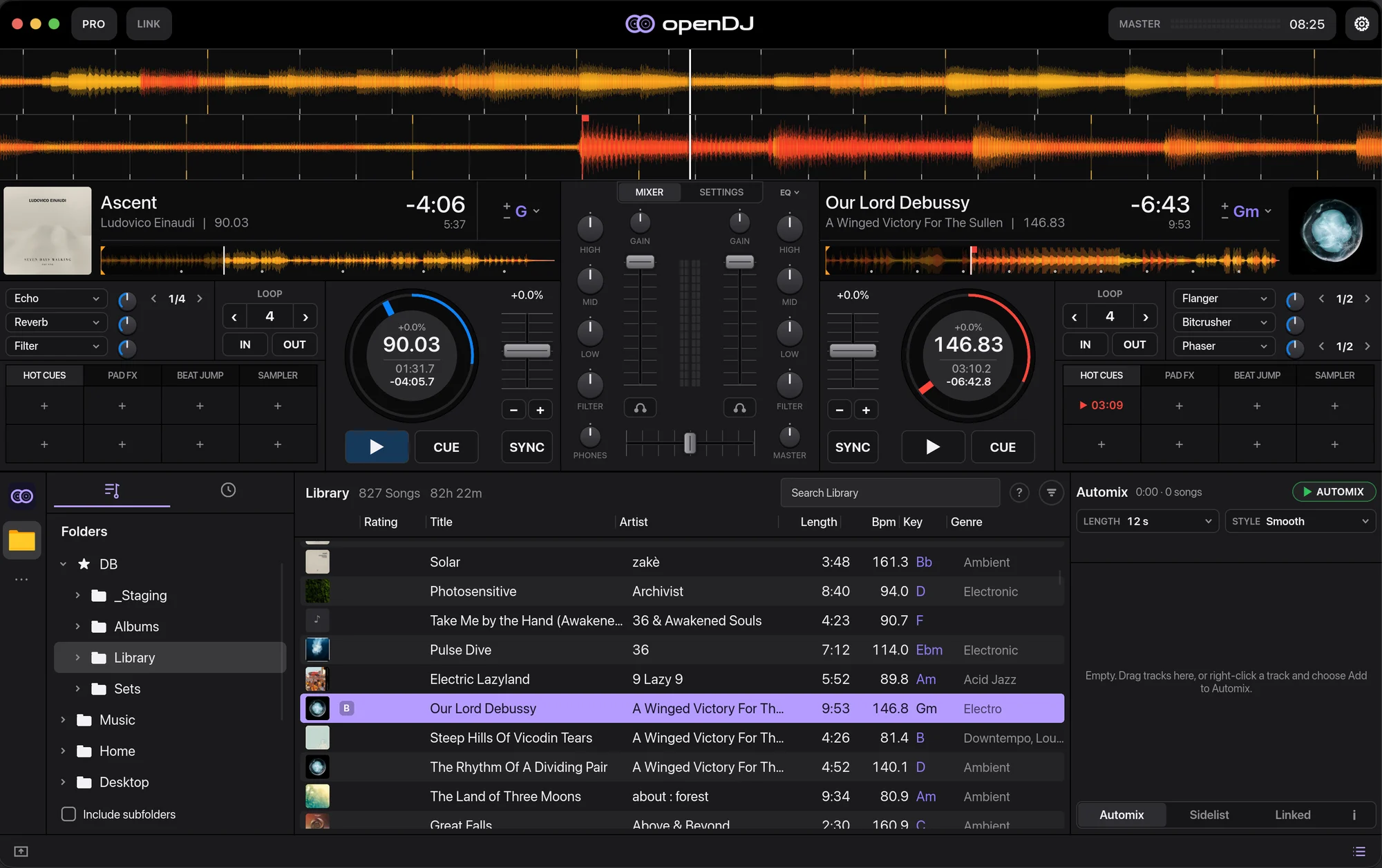
Find the next track.
Search your music folder by title, artist, BPM or key, with playlists, smart lists and ratings.
Lock the grids.
Accurate beat grids that follow tempo changes, sync and quantize keep both decks in time.
Blend it in.
Gain, 3-band EQ, filter, faders and a crossfader, with headphone cue for the next track.
Make it yours.
Hot cues, loops, beat jumps and four beat-synced effect units on every deck.
Automix
Let Automix take the next one.
- Queue your tracks. Drag them into the Automix list, or right-click any track and add it.
- Pick a length and a style. Short cuts or long, smooth blends, in seconds or bars.
- Press Automix. openDJ beatmatches and crossfades through the list while you step away, or jump in at any time.
Layouts
Room for the decks, or room for the music.
Pro gives you the full decks, pads and effects. Player shrinks both decks to one row so your library gets the screen. A compact view hides the waveforms altogether.

Controllers · Mixxx mappings
Plug in your controller.
openDJ uses Mixxx's controller mappings, so most MIDI controllers Mixxx supports work as soon as they're plugged in. No setup, no mapping files to hunt for.
HID controllers aren't supported yet. If yours doesn't work right, tell us which one and testers' controllers are fixed first.
Everything a mix needs.
- 01
Beat grids
Grids that follow tempo changes, with tools to fix them by hand.
- 02
Key detection
Every track gets a key, with harmonic mixing hints and key shift.
- 03
Stems
Play NI stem files, or split any track with Demucs if it's installed.
- 04
Ableton Link
Play in time with other apps and devices on your network.
- 05
GPU waveforms
Fast waveforms drawn on the GPU, coloured by frequency.
- 06
Library
Playlists, smart lists, ratings, colours, play history and fast search.
Under the hood
Rust, end to end.
openDJ is a ground-up rewrite in Rust that follows Mixxx's control names, data formats and behaviour. The interface is built with Slint, and the waveforms are drawn with wgpu shaders. It's free software under the GPL, version 2 or later.
Help shape the beta.
Bugs, ideas, or just how it felt to use: every report helps. In the app, Settings → Feedback opens a report with your version filled in. Testers are thanked by name in the release notes, vote on what's built next, and get their controllers fixed first.
Download openDJ.
Free, for macOS and Linux. Version 0.1.0.
macOS
Apple Silicon and Intel, macOS 11 or newer.
Download for MacNot notarised yet: right-click openDJ and choose Open the first time.
Linux
x86_64, glibc 2.35 or newer (Ubuntu 22.04+, Fedora 36+, Debian 12+).
Download AppImage or the .tar.gzAll releases and release notes · Windows is planned for 2.0.